Welcome back to another Two-Track Tuesday blog! Last week we talked about what mixing and mastering is. Everything from getting started to what kind of software and equipment that is used to get the job done. This week I want to go into everything I use at DBS. We'll talk about my favorite DAW, plug-ins and the equipment I have in my studio and how they work. I hope you enjoy!
Studio monitors (Speakers)
First, let's talk about the equipment in my studio. Over the years, I've tried out many different monitors. When I was getting started I had a pair of Presonus Eris 3.5 I got as a gift for Christmas. If you look up a picture of them, you would quickly find out that they are not ideal. At the time I couldn't afford a professional set of monitors so I had to go with what was available to me. I mixed an album on those monitors and I'm still impressed with the way I was able to pull off a good sound!
Once I realized the Eris 3.5s weren't going to work anymore, I found a great deal for a pair of Yamaha HS5s’. These monitors were a huge upgrade in quality and a slight upgrade in size. The smaller your monitors are, the less of the deep bass response you're going to receive from them. What I really like about the Yamaha's is the mid range. I enjoy mixing vocals on them, but only being a 5 inch speaker. It was difficult to shape the bass frequencies. About a year after getting the HS5s, a friend of mine, let me borrow their Yamaha HS8s. As you can imagine these are indeed the same monitor, but with an 8 inch speaker. With the bigger speaker I was receiving better bass response which is important for receiving the full spectrum of frequencies when mixing, but also being a bass player I gotta feel that low end! So now the problem with this was I had to give them back… this opened my ears to what it would sound like if I had this kind of speaker in my studio. It was now time to go shopping.
I spent a while google searching, reddit scrolling, watching YouTube reviews which helped a lot once I asked a savvy friend of mine what they would recommend for me. I landed on the Kali Audio IN-8 V2 monitors. What's most important is that I'm getting a full spectrum frequency response meaning that I'm hearing all of the low end, accurate mid range and clean treble frequencies so when I'm mixing I'm able to translate what I'm hearing to every speaker you're gonna listen to this mix from. That's why I chose these monitors. They had everything I needed as well as the design I was looking for to accommodate a smaller studio.
Hardware
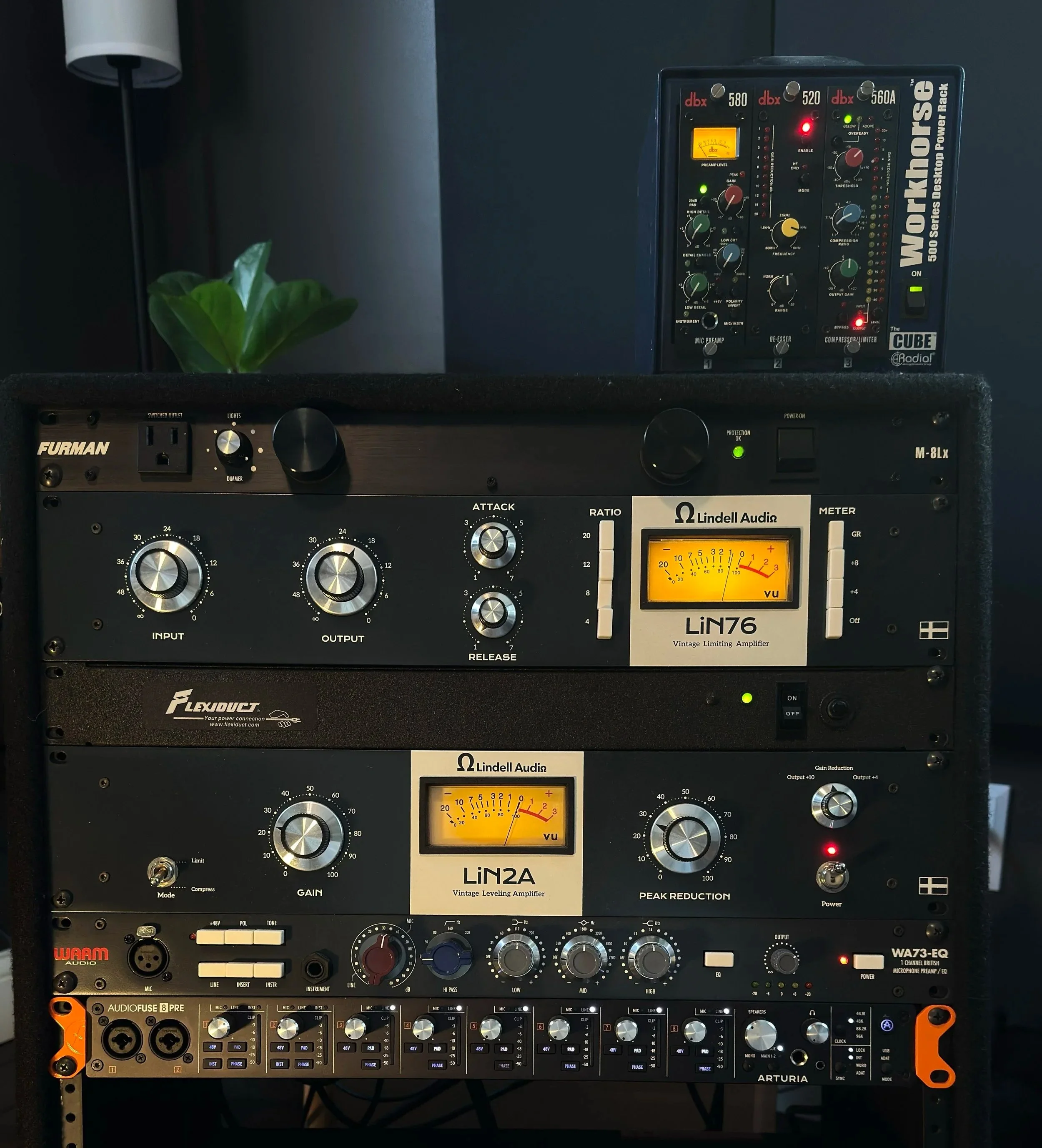
Pictured from top to bottom:
(Blue Box top right) Radial workhorse 500 series cube containing:
DBX 580 preamp | DBX 520 De-esser | DBX 560A compressor
(In the rack below)
Furman M-8Lx power conditioner
Lindell Audio LiN76 FET compressor (Field Effect Transistor)
Lindell Audio LiN2A optical tube compressor
Warm audio WA73-EQ preamp
Arturia Audiofuse 8 Pre audio interface
For the hardware picture above, I'm just going to briefly explain what each does and why I use them. First up is the little blue box on the top right of the picture containing three 500 series units. 500 series units are compact versions of the bigger units you see on the bottom of the rack. The DBX 580 Preamp is designed to increase the channel volume from “mic” to “line” level. Basically meaning it increases the volume and adds some color to the sound with the “low detail” and “high detail” knobs.
In the middle of the cube is the DBX 520 De-esser. A de-esser is designed for the sound of an “S”. When mixing vocals, the sound of the letter “S” or “C” can be unpleasant and piercing. That’s where a de-esser helps. You dial in the specific frequency the overbearing S is located, then every time that frequency spikes it decreases the gain of that frequency region. A de-esser is a kind of single band compressor which compresses only the frequency you dial in instead of the whole channel getting turned down when the gain is reduced. Vocals will sound much cleaner and pleasant when a de-esser is needed.
On the right side of the cube is the DBX 560A compressor. This unit is the 500 series iteration of the classic DBX 160A compressor. At about 1/10th the size of the original unit, this 560A can be aggressive or subtle. Unlike the de-esser above, this will compress the entire signal of whatever you pipe through it at the threshold you cap it at. Great on snare and kick drums, vocals, pianos, guitars and just about everything else.
Next starting on the top of the black rack, is a Furman power conditioner. This has nothing to do with audio and everything to do with stabilizing AC current so all the gear is protected from surges but it also cleans current so there is no possibility of “buzzing”. “Dirty” power can induce buzzing audio…the last thing we want when we’re mixing or mastering.
The LiN76 is an FET (Field Effect Transistor) compressor clone based on the $5,000 Universal audio Uri 1176 Rev J compressor. At a mere fraction of the price, Lindell audio has created an incredible low cost edition of this unit that I hear creates nice depth and warmth to the signal. Using transistors, an FET style compressor will detect volume spikes, as well as shape the tone that is coming out of it. This is a big reason why I like to have both the physical hardware, as well as the plug-in versions of these units. When you run audio through real physical wires and transistors, the tone does change!
The LiN2A looks a lot like the LiN76. They both do the same thing as they are both compressors, but the way they do it is much different. The LiN2A is also a clone, but of the Universal Audio LA2A. This is known as an optical tube compressor which converts audio signal into light, where the brightness of that light controls the compression which is such an interesting way to get the job done. It is a much smoother kind of compression. To put the cherry on top, it also has vacuum tubes inside which amplify, smooth and color the tone coming out of it. As you can see this is a big reason why I like to have both the physical hardware, as well as the plug-in versions of these units. When you run audio through real physical wires, tubes and transistors, the tone does change! Having that small option really makes a huge difference sometimes.
Next is the Warm WA73-EQ. This unit is a preamp that does the same as the DBX preamp listed above, but has a much different personality. Based on the incredible and famous Neve 1073 preamp that has shaped the tone of thousands of albums, the warm 73-Eq does a good job of providing a similar sound. I like to turn this thing up to where it starts to add distortion on something like bass or even hi-hats for a crisp tone. To me I think it’s nice to have physical preamps joined to a digital recording for adding warmth and tone to what would sound “sterile” if untouched. As always that is my opinion and doesn’t have to be the case. I don’t even use it on every project.
Lastly on the bottom of the rack with the orange ears is the Arturia AudioFuse 8 Pre interface. An interface is merely a way to connect all of this equipment to your computer via USB. This unit has 8 inputs and outputs so I can integrate all of the hardware into the DAW.
Plug-ins
Plug-ins are a vast world. Not only are they digital software clones of hardware like the equipment I have in physical form, but they are also a world of their own. For example, if I have two background vocals that are supposed to match pitch and rhythm, but they aren’t lining up consistently either way, I can use a specific plug-in to actually just push a single button to fix everything without going into edit each note individually. Another example of a non-clone type plug-in is “Fresh Air” by Slate digital which utilizes mid and high knobs to increase specific high frequencies to enhance “air” or a shimmer coming from an instrument or vocal track. All are great to use though, I tend to gravitate more towards the clones of physical hardware on a daily basis.
There are many companies that create plug-ins. The companies I like to use are Universal Audio, Solid State Logic, Slate, Plugin Alliance suites, bx, Waves and iZotope. Each of these companies offer plug-in “suites” which is just a massive collection of plug-ins each have created in their own way. Some companies even clone the same hardware.
Digital Audio Workstation (DAW)
The loaded question every engineer has to confront when starting in this industry is “What DAW am I going to use?”. If you are curious what a DAW is, go check out the “What is mixing and mastering” blog! There are many ways to choose a DAW. Do I like the way it looks? Does it run well on my computer? Can I get into a flow with it while working? Are there enough features? How much does it cost? These are just a few of the questions that will provide you with your answer.
I use Studio One Pro 7, Logic Pro and Pro Tools. I am proficient in all three but there are reasons why I stuck with 3 instead of just 1. Studio One is a great DAW that has plenty of features, great work flow, fast and fluid on my computer, highly customizable, competitive price and it is changing the game with integrations as well as incorporating AI. Logic Pro is another DAW I enjoy working on because it’s made to work on my Apple computers. It has a great interface and is also very easy and quick to work with. The keyboard shortcuts are very easy to use for fast workflow. Though there are a couple drawbacks that place it at #2. It’s not very customizable and there are certain plug-ins that won’t work with it without pulling some strings. Last on the list is the industry standard, Pro Tools. I have a love-hate relationship with Pro Tools. Another DAW that has smooth and fast workflow with a great interface. I love the way it looks, feels, responds and supports all plug-ins. The worst part about Pro Tools is the price as well as the bugs that keep showing up that ruin workflow. It is very easy to crash and will not tolerate the slightest corruption. It seems like a new error message pops up every day and it’s never the same. Still, it is the industry standard and a DAW you must have to make it easy to send projects back and forth to artists or studios. In the end this is why I have settled on Studio One. What works best for me? What sounds good? What gets the job DONE? This is how I found my favorite software and equipment.
I hope you learned something and enjoyed this weeks Two-Track Tuesday blog. My goal is to keep educating about my process and the engineering world.
Tune in next week for a discussion on compression. The different kinds of compressors as well as what I use them on and how.